Configuration
Configuration splits into what the operator sets at install time and what the admin changes at runtime from the System Setup screen.
1. Install time (operator)
- A TOML config file (
config.toml) bootstraps the first admin account (idempotent). Path via--config/CONFIG_FILE. - Required env:
JWT_SECRET,INGEST_TOKEN,DOC_SIGNING_KEY,DATABASE_URL. Optional:FRONTEND_DIR,SMTP_*,COOKIE_DOMAIN,SINK_HOST,DNS_ZONE. - On AWS these are rendered into the instance from SSM SecureString by userdata — secrets never sit in plaintext.
2. Runtime (admin) — the System Setup screen
Once installed, the admin configures the rest from System Setup
(/installation.html). Changes take effect immediately — no restart.
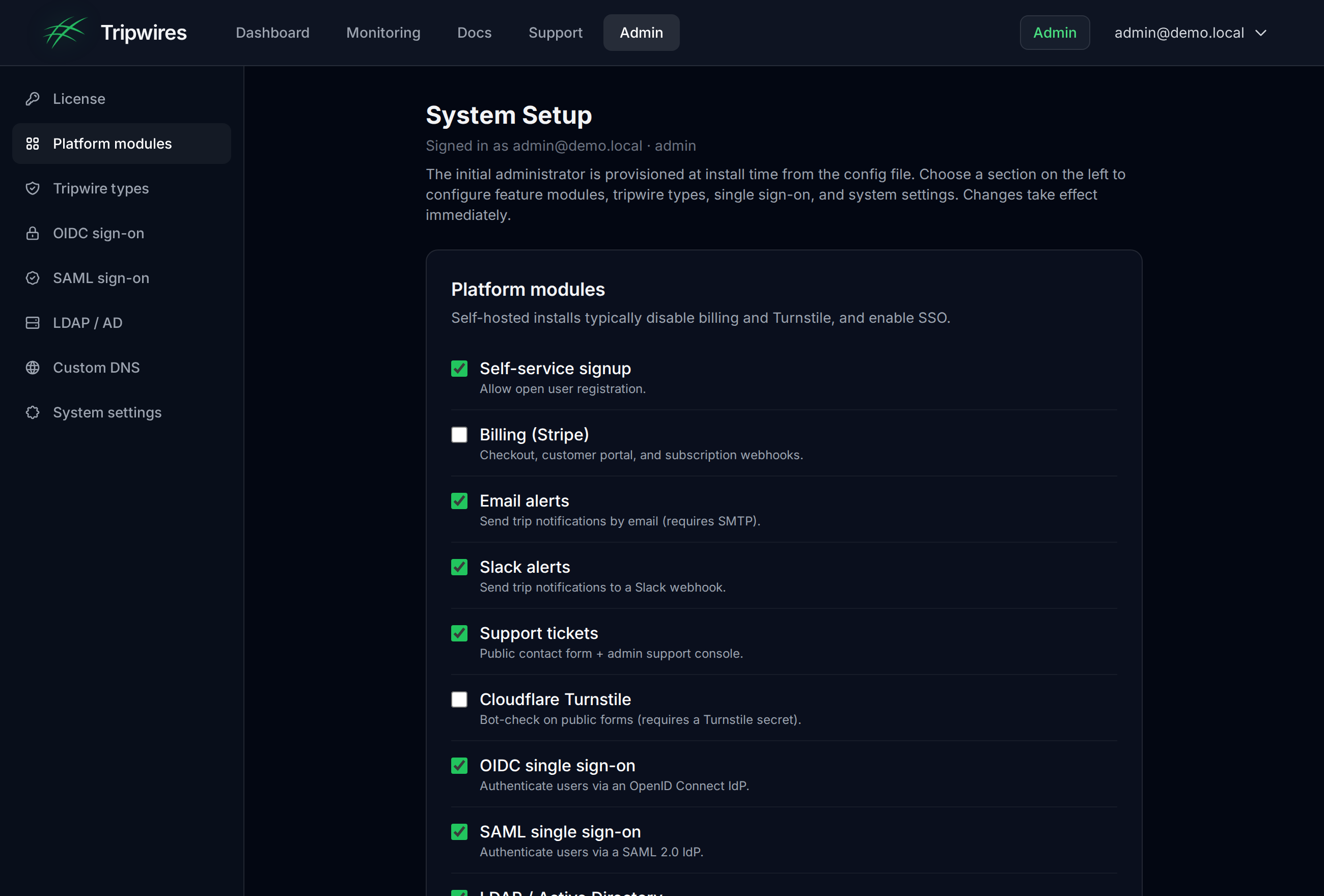
The System Setup screen — platform modules, tripwire-type toggles, OIDC / SAML / LDAP, and DB-backed system settings.
- Platform modules — signup, billing, email / Slack alerts, support, Turnstile, SSO. (Self-host only.)
- Tripwires — a labelled group with per-type toggles: protocol honeypots, canary documents, cloud credentials, execution triggers, QR codes, phishing detection. Disabling a type blocks its creation.
- System settings — DB-backed key/value pairs.
Custom DNS for tripwires
By default a self-hosted server bakes the gettripwires.com sink into new tripwires. Point them at your own DNS so beacons and DNS-token lookups resolve to your sink instead. Configure it in Admin → System Setup → Custom DNS (takes effect immediately, no restart) or via environment variables. Precedence: System Setup config → environment → built-in default.
- Honeypot domain — the base domain (e.g.
canary.acme.example). The beacon host and DNS-token zone derive from it assink.<domain>andd.<domain>. - Sink host (optional override) — the host tracking URLs and document call-homes hit. Point its DNS at your sink / reverse proxy.
- DNS-token zone (optional override) — the zone used for DNS-token hostnames; delegate it with an NS record to your sink’s resolver.
HONEYPOT_DOMAIN=canary.acme.example   # derives sink.<domain> + d.<domain>
SINK_HOST=sink.canary.acme.example    # explicit beacon-host override
DNS_ZONE=d.canary.acme.example        # explicit DNS-token zone override
Only tripwires created after the change use the new DNS; existing tripwires keep the host they were minted with.
SIEM / SOC forwarding
Forward every detection to your security team's collector, deployment-wide, in addition to per-user Slack/email. Two connectors, both optional and best-effort (a slow or absent collector never blocks detection recording):
| Env var | Purpose |
|---|---|
| SIEM_WEBHOOK_URL | POST a structured JSON detection event to this URL (generic webhook / Splunk HEC-style / Sentinel / Elastic) |
| SIEM_SYSLOG_ADDR | host:port of a syslog collector — sends an ArcSight CEF message (Splunk, QRadar, Sentinel, ArcSight) |
| SIEM_SYSLOG_PROTO | udp (default) or tcp |
| SIEM_SYSLOG_TAG | syslog tag (default tripwire) |
Example CEF line:
CEF:0|Levantar|Tripwire|1.0|tripwire-triggered|Tripwire decoy triggered|8|externalId=tw1 cs1Label=TripwireName cs1=prod-db src=8.8.8.8 app=postgres rt=2026-06-02T00:00:00ZVerify it with the mock SOC collector
A dependency-free mock collector ships in
deploy/siem-mock/ — it listens for the CEF syslog and JSON webhook and
prints each detection, so you can confirm forwarding end-to-end before wiring your
real SIEM:
# 1. run the mock collector
node deploy/siem-mock/siem-mock.mjs

# 2. point the control server at it
SIEM_WEBHOOK_URL=http://<host>:8088/ingest
SIEM_SYSLOG_ADDR=<host>:5514

# 3. trip a decoy — both a CEF line and a JSON event arrive at the collectorSCIM 2.0 provisioning (directory integration)
Let an identity provider (Entra ID, Okta, …) push user and
group lifecycle into Tripwire — the companion to SSO. It automates the
leaver case (deprovision on offboard) and syncs
AD/IdP security groups → roles. Point your IdP's SCIM
connector at https://<host>/scim/v2 with a bearer token.
| Env var | Purpose |
|---|---|
| SCIM_TOKEN | enables /scim/v2; the IdP authenticates with this bearer token |
| SCIM_GROUP_ROLE_MAP | group→role map, keyed by the IdP's stable group externalId (recommended) or display name, e.g. Tripwire Admins=admin,SOC=admin — a user in a mapped group gets that role (the AD-group sync) |
| SCIM_PROTECTED_USERS | comma-separated usernames/emails SCIM may never modify or disable (break-glass / local admins). The bootstrap admin is protected automatically — guards against IdP-driven lockout. |
| SCIM_DEFAULT_TIER | subscription tier stamped on provisioned accounts (default enterprise) |
Supported: Users (create / get / list / replace / active toggle / delete)
and Groups (create / get / list / member PATCH / delete) with pagination, plus
ServiceProviderConfig. A leaver (active:false or DELETE) disables the
account rather than hard-deleting it, preserving the audit trail. Every SCIM mutation is
written to the audit log (actor scim).
Verify end-to-end with the bundled mock IdP (joiner → AD-group sync → leaver):
SCIM_TOKEN=<token> ./deploy/scim-mock/provision.sh alice@corp.exampleFeature toggles — what applies where
- Tripwire-type toggles apply to both the SaaS and self-host. The SaaS keeps every implemented type on; a self-hosted admin configures them per installation.
- Platform modules (billing / SSO / alerts / support) are self-host only; the SaaS gates those by subscription tier.
- Gating lives in the composition root / shim, never in shared
coreuse cases — so the two deployments can't bleed into each other.
SAML 2.0 single sign-on
Enable the sso_saml module, then fill in the SAML 2.0 SSO section of System Setup. The control server is a SAML service provider (SP) that initiates login, verifies the IdP's signed assertion (signature, audience, destination, InResponseTo and validity window) and issues the normal session — the same path as OIDC and LDAP. Works with Keycloak, ADFS, Azure AD, Okta and any SAML 2.0 IdP.
- IdP Metadata URL — the IdP's SAML descriptor (e.g. Keycloak
/realms/<realm>/protocol/saml/descriptor). Supplies the SSO endpoint and signing certificate. - Service Provider Entity ID — typically this server's metadata URL,
https://your-host/auth/saml/metadata. - ACS URL —
https://your-host/auth/saml/acs(must match exactly; the assertion's Destination is checked against it). - IdP Certificate — optional. The metadata URL normally provides it; paste one to pin or to cover a rotation.
Register this server with your IdP using its published SP metadata:
GET https://your-host/auth/saml/metadata   # SP descriptor (entity id, ACS, SP cert)
GET https://your-host/auth/saml/login      # start SP-initiated login
POST https://your-host/auth/saml/acs       # IdP posts the signed assertion here
Optional environment variables (also seedable instead of System Setup):
SAML_IDP_METADATA_URL=...   # enables sso_saml + sets the IdP metadata URL
SAML_ENTITY_ID, SAML_ACS_URL
SAML_IDP_CERT               # optional PEM to pin the IdP signing cert (metadata normally supplies it)
SAML_SP_KEY, SAML_SP_CERT   # SP signing keypair (PEM); ephemeral if unset
SAML_ADMIN_ROLE=tripwire-admin   # group/role value that grants the admin role
An assertion's email attribute (or an email-format NameID) identifies the user; a groups/memberOf/role attribute matching SAML_ADMIN_ROLE grants admin. Set SAML_SP_KEY/SAML_SP_CERT in production so the published SP metadata is stable across restarts.
Observability — health probes & metrics
The control server exposes operational endpoints for your platform team (the SaaS reports to CloudWatch; on-prem scrapes these directly). No configuration is required.
GET /healthz— liveness. Returns200 okas long as the process is up.GET /readyz— readiness. Returns200 readyonly when the database is reachable, otherwise503. The Docker image wires this as itsHEALTHCHECK; point your k8s readiness probe at it too.GET /metrics— Prometheus text exposition:tripwire_http_requests_total(by method/code),tripwire_trips_detected_total,tripwire_notifications_sent_total(by result), plustripwire_database_up,tripwire_uptime_seconds,go_goroutinesandtripwire_build_info.
Metrics expose aggregate counts only (no secrets). To require authentication when exposing /metrics beyond your network, set METRICS_TOKEN and have Prometheus send Authorization: Bearer <token>.
scrape_configs:
  - job_name: tripwire
    metrics_path: /metrics
    static_configs:
      - targets: ["your-host:8080"]
    # authorization:           # only if METRICS_TOKEN is set
    #   credentials: <token>
Air-gapped / zero-egress build
The admin UI served by the on-prem control server makes no third-party requests — it is safe for air-gapped and privacy-sensitive deployments. The SaaS build keeps these integrations; only the self-host image is stripped, at image-build time, by deploy/strip-egress.sh.
- Removed entirely: product analytics, the Termly cookie banner, Google Fonts (the UI falls back to the system font stack), and Stripe (billing is disabled on self-host).
- Vendored locally: syntax highlighting (highlight.js) and the technology logos are served from
/assets/vendor/inside the image instead of a CDN. - Turnstile: the CAPTCHA loader is replaced by a local no-op stub. The server already skips Turnstile verification unless
TURNSTILE_SECRETis set, so forms work unchanged.
No configuration is required — the stock image is zero-egress by default. To confirm, watch the browser network tab on any page: every request stays on the control server's own origin.